

Google Ads Optimization Score: Why Chasing 100% Hurts Campaign Performance
Most advertisers treat Google's Optimization Score as a performance metric. It isn't one — and misunderstanding what it measures leads to inflated CPAs, lower ROAS, and wasted budget.
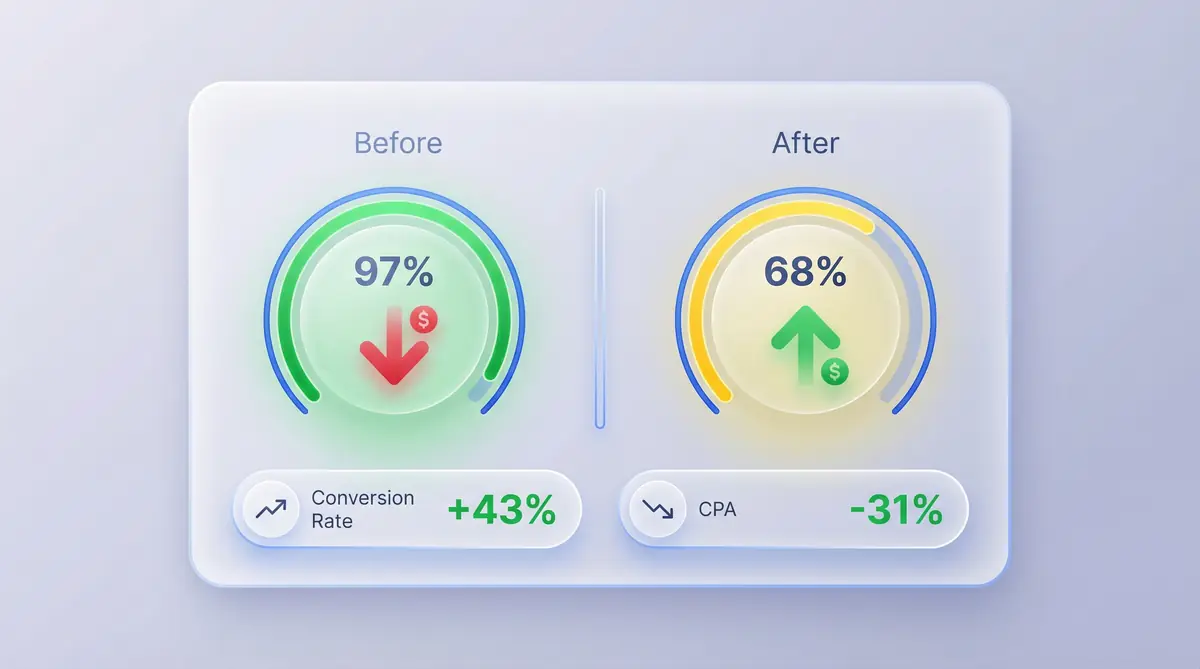
Optmyzr's study of 17,380 Google Ads accounts found that the correlation between Optimization Score and actual ROAS is just r=0.29 (weak). Meanwhile, its correlation with ad spend is r=0.81 (very strong). The score reliably predicts one thing: higher spending.
This guide breaks down what the score actually measures, which recommendations to accept or reject, and the framework top-performing agencies use to manage it.
What Optimization Score Actually Measures
Jyll Saskin Gales, a former Google employee of six years and now an independent ads consultant, describes it plainly:
"Optimization score is not a measure of how well your account is performing. It's a measure of whether you are reviewing your recommendations."
The score tracks recommendation engagement — not campaign results, not profitability, not lead quality.
One detail most advertisers overlook: dismissing a recommendation raises the score exactly the same as accepting it. An account can reach 100% by rejecting every suggestion Google makes, without changing a single campaign setting.
The score was originally developed as an internal tool for Google's advertising sales representatives — a way to identify upsell opportunities during client conversations. It was designed to measure Google's revenue potential, not advertiser success.
How the Score Is Weighted
Google assigns different weights to each recommendation category:
| Category | Score Weight | Typical Recommendations |
|---|---|---|
| Bidding & Budgets | 35% | Increase budgets, switch to automated bidding |
| Keywords & Targeting | 25% | Add broad match, expand audience segments |
| Ads & Extensions | 20% | Create responsive search ads, add extensions |
| Repairs & Fixes | 20% | Fix disapproved ads, set up conversion tracking |
60% of the score is driven by recommendations that primarily increase spend or shift control to Google's automation. The "Repairs" category — the only one focused on fixing genuine account issues — represents just 20%.
This weighting creates a structural misalignment. The fastest path to a high score is increased spending and broader automation. The fastest path to better ROI is typically the opposite — tighter targeting, controlled budgets, and manual oversight of bidding strategies.
What Large-Scale Research Reveals
The Optmyzr study (17,380 accounts, six months, $500–$1M monthly spend) produced a headline that initially appears to validate the score: accounts at 90–100 showed 186% better ROAS than accounts below 70.
Three findings beneath that headline tell a different story:
1. ROAS is essentially flat between 70 and 90. The performance gap exists only between poorly managed accounts (sub-70) and actively managed ones. Above 70, additional score points produce no meaningful ROAS improvement.
2. Only 5.5% of accounts accepted recommendations. The remaining 95% rejected or dismissed Google's suggestions. High scores were achieved through engagement with the recommendation system — not through compliance.
3. 19% of accounts scored 90+ while rejecting every recommendation. These accounts reached top scores without implementing a single change.
Optmyzr's conclusion: "Higher Optimization Score is not the cause of better results. The true cause is actively managing your account."
The 3-Bucket Framework for Evaluating Recommendations
Rather than evaluating each recommendation individually, a systematic approach categorizes them by alignment between Google's interests and advertiser objectives.
Bucket 1: Accept (Fixes Genuine Problems)
These recommendations address real account issues where Google and the advertiser are fully aligned:
- Disapproved ads. Ads aren't serving. Resolving policy violations restores campaign delivery immediately.
- Missing conversion tracking. Without tracking, bid strategies and campaign optimization have no signal to work with. Proper GA4 setup is essential here.
- Conflicting negative keywords. In accounts running for five or more years, negative keyword conflicts frequently block ads from appearing on high-intent searches. These conflicts accumulate silently and can number in the thousands.
Bucket 2: Test (Context-Dependent)
These recommendations can improve performance but outcomes vary significantly by account:
- Ad extensions. Generally worth implementing — they increase ad real estate in search results. Exceptions: call extensions add no value for ecommerce, and location extensions are counterproductive without physical locations.
- Responsive search ad suggestions. May signal overly broad ad groups or insufficient copy variation. Worth reviewing the specific suggestions rather than auto-accepting.
- Audience refinements. If the suggested audiences align with documented buyer personas, testing is warranted. Generic "expand audience" suggestions belong in Bucket 3.
Bucket 3: Reject by Default (Primarily Increases Spend)
These recommendations disproportionately benefit Google's revenue over advertiser ROI:
- Budget increases. A Search Engine Land analysis reviewed 50 budget increase recommendations across multiple accounts. Every one would have reduced ROAS or doubled CPAs — without exception.
- Broad match expansion. Google recommends broad match because the account isn't using it, not because performance data supports it. Broad match significantly expands query matching, often triggering irrelevant searches that inflate CPA — particularly in niche and B2B verticals.
- Performance Max migration. PMax consolidates campaigns across Google's entire network but eliminates visibility into which placements, keywords, and audiences drive conversions. Understanding the attribution model in use is critical before migrating — PMax makes granular performance analysis nearly impossible.
- Auto-apply. Allows Google to implement recommendations — including adding keywords and creating new ads — without advertiser approval. This is the highest-risk setting in any Google Ads account.
Auto-Apply: The Highest-Risk Default Setting
Auto-apply enables Google to implement recommendations without manual review or approval. Many accounts have this enabled without the advertiser's knowledge.
How to audit auto-apply settings:
- Navigate to the Recommendations tab in Google Ads
- Select Auto-Apply (top right corner)
- Review all checkboxes — uncheck any that are enabled
In one documented case, an HVAC services company enabled auto-apply and experienced an 88% increase in ad spend, 67% increase in cost per lead, and 41% decline in ROI within 90 days. Recovery required six weeks of manual optimization and approximately $28,000 in excess spend.
Auto-apply removes the human judgment layer from campaign management. Google's algorithms optimize for impression volume and engagement — not for advertiser profit margins or lead quality.
Recommended Score Ranges by Account Maturity

Targeting 100% is counterproductive. Research supports the following ranges based on account management sophistication:
| Account Type | Recommended Range | Approach |
|---|---|---|
| Early-stage (new to Google Ads) | 75–85% | Accept most recommendations while building account knowledge |
| Established (active campaign management) | 65–75% | Accept technical fixes and tested improvements; reject spend-increase recommendations |
| Advanced / Agency-managed | 55–70% | Strategy is more granular than Google's generic recommendations support |
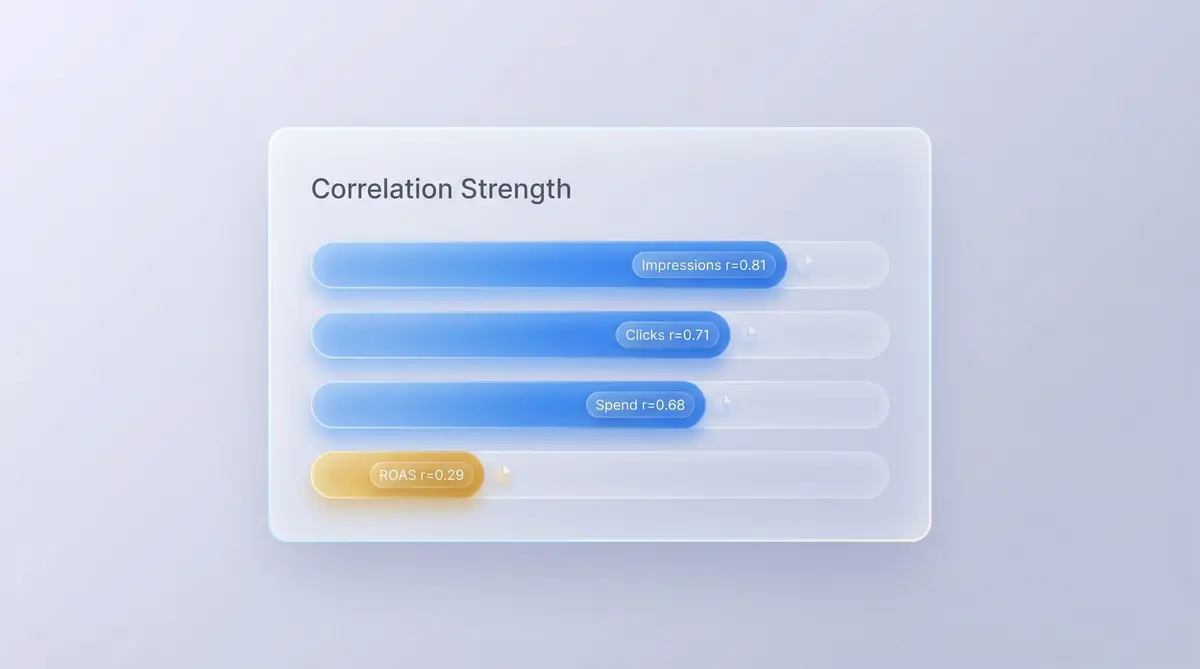
A case study from Click Fortify illustrates this clearly: an account managed by a previous agency that followed every recommendation showed an Optimization Score of 97% — and declining ROI.
After an audit that removed broad match keywords, adjusted bidding strategies, disabled auto-apply, and tightened location targeting, the score dropped to 68%. Within 60 days: conversion rate increased 43% and CPA decreased 31%.
Implementation Checklist
1. Audit auto-apply settings. Navigate to Recommendations → Auto-Apply and ensure all boxes are unchecked. This is a 30-second change with potentially significant budget impact.
2. Dismiss unused recommendations rather than ignoring them. Dismissing raises the score without modifying account settings — maintaining a presentable score for stakeholder reporting while preserving campaign integrity.
3. Address technical recommendations immediately. Disapproved ads, missing conversion tracking, and negative keyword conflicts represent genuine account issues. These are the recommendations that consistently deliver value.
4. Default to rejecting budget and broad match recommendations. Only increase budgets when internal performance data — not Google's dashboard — confirms profitable capacity to scale. When scaling, ensure landing pages are optimized for conversion to avoid wasting the additional spend.
5. Report performance metrics, not the Optimization Score. ROAS, CPA, conversion rate, and revenue reflect business outcomes. Tools like ObserviX provide multi-touch attribution that connects ad spend to actual revenue — a fundamentally different measure than recommendation compliance.
Key Takeaways
-
Optimization Score measures recommendation engagement, not campaign performance. Dismissing a recommendation increases the score identically to accepting it.
-
60% of the score is weighted toward spend-increasing recommendations. The scoring system structurally favors Google's revenue model over advertiser profitability.
-
The optimal range for most accounts is 65–80%. Across 17,380 accounts, ROAS shows no meaningful improvement between scores of 70 and 90.
-
Apply the 3-Bucket Framework systematically. Accept technical fixes (Bucket 1), test contextual improvements (Bucket 2), reject spend increases by default (Bucket 3).
-
Audit auto-apply settings immediately. This is the single highest-impact action for protecting campaign ROI.
Optimization Score measures what Google wants. Attribution data measures what works. ObserviX provides multi-touch attribution across the full customer journey — enabling teams to optimize campaigns based on revenue impact, not compliance scores. Start your free trial.